
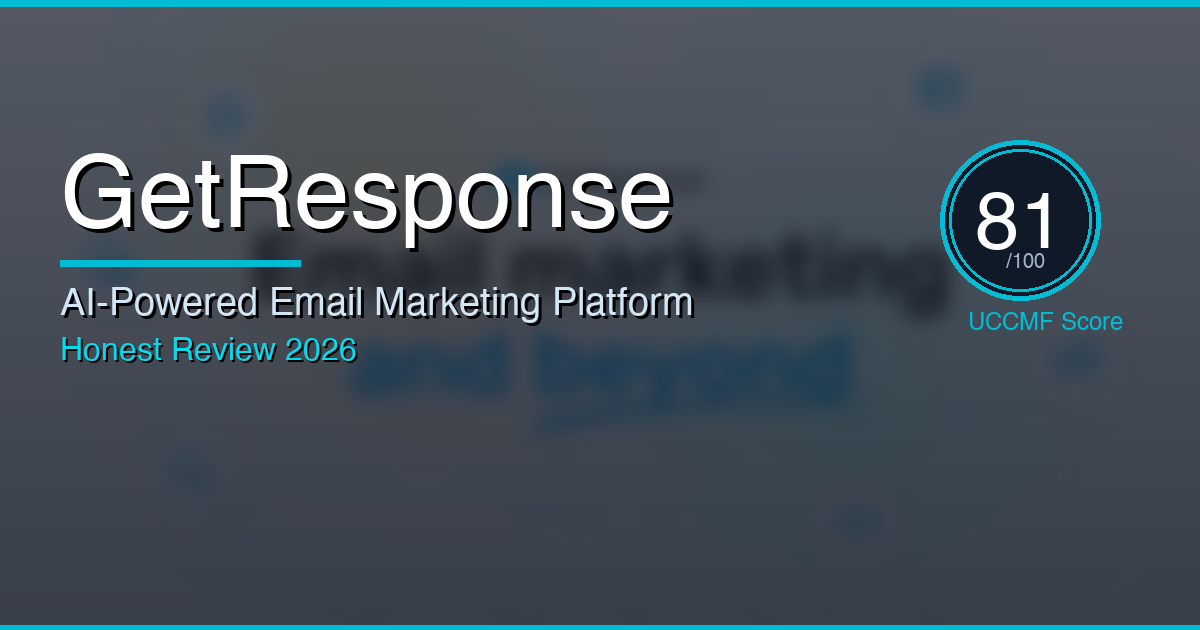
GetResponse Review 2026: AI-Powered Email Marketing Tested for Ecommerce — Worth It?
Last updated: February 17, 2026 · By Wolf Huang · 16 min read
Disclosure: This article contains affiliate links. If you purchase through our links, we may earn a commission at no extra cost to you. We only recommend tools we’ve personally tested.
⚡ Quick Verdict
GetResponse has quietly evolved from a simple email newsletter tool into a full-stack AI-driven marketing platform in 2026 — and it punches well above its price point. With unlimited email sends on every paid plan, a visual automation builder that rivals Klaviyo, built-in landing pages, conversion funnels, and now AI-powered email and subject line generators, it’s one of the best value propositions in email marketing today. The catch? The AI features on the Starter plan are capped at 3 uses, and you’ll need the Marketer plan ($59/mo) to unlock the automation power that makes this platform shine.
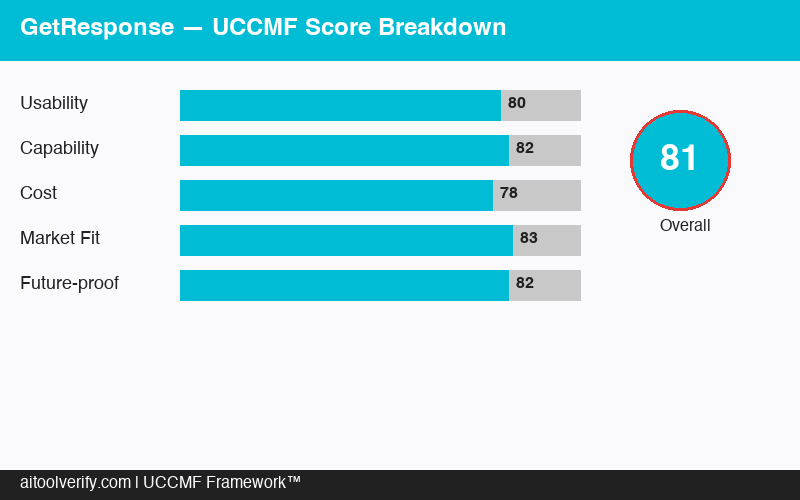
UCCMF Overall Score: 81/100 — Exceptional value for SMBs. Best-in-class automation at its price point.
🏆 UCCMF Score Breakdown
U — Usability (15%): 80/100
C — Content Quality (25%): 78/100
C — Cost-effectiveness (20%): 90/100
M — Marketing Fit (30%): 82/100
F — Flexibility (10%): 74/100
Weighted Total: 81/100
📑 Table of Contents
- What Is GetResponse?
- UCCMF Deep Dive
- AI Features Tested
- Ecommerce Test Results
- Pricing Breakdown
- GetResponse vs Competitors
- 🐺 Wolf’s Pick
- FAQ
- Final Verdict
What Is GetResponse?
GetResponse is a Poland-based email marketing and marketing automation platform that’s been around since 1998 — making it one of the longest-running players in the space. But don’t let that history fool you into thinking it’s outdated. The 2025–2026 iteration of GetResponse is anything but legacy software.
What sets GetResponse apart in 2026 is its all-in-one approach at a mid-market price. While competitors like Mailchimp have stripped features from lower tiers and Klaviyo has pushed pricing upward, GetResponse has gone the opposite direction — packing more tools into every plan and keeping prices competitive.
Here’s what the platform includes across its plans:
- Unlimited Email Sends — Every paid plan, no send caps. This alone sets it apart from Mailchimp’s tiered sending limits.
- AI Email Generator — GPT-powered tool that creates full email drafts from a brief prompt (limited to 3 uses on Starter)
- AI Subject Line Generator — Generates optimized subject lines based on your email content (also 3 uses on Starter)
- Visual Automation Workflow Builder — Drag-and-drop workflows with 15+ trigger conditions, scoring, tagging, and conditional splits
- Landing Page Builder — No-code builder with 200+ templates, A/B testing, countdown timers
- Conversion Funnels — Pre-built sales funnels that connect landing pages → emails → payment (Marketer plan and up)
- Webinar Hosting — Built-in webinars for up to 1,000 attendees (Creator plan)
- Website Builder — Full AI-assisted website builder (Creator plan)
- Course Creator — Build and sell online courses directly within GetResponse (Creator plan)
- Ecommerce Integrations — Shopify, WooCommerce, Magento, Etsy, and more
- Perfect Timing & Time Travel — AI-optimized send times based on subscriber behavior and timezone
- SMS Marketing — Available on Enterprise plans
In short, GetResponse is trying to be the platform where a small-to-medium business can run their entire marketing stack — email, landing pages, webinars, courses, and automation — without paying for five separate tools. And for many businesses, it succeeds.
UCCMF Deep Dive
U — Usability (Score: 80/100, Weight: 15%)
GetResponse’s interface received a significant redesign in late 2024, and the 2026 version is clean, modern, and logically organized. The main dashboard gives you a snapshot of your list growth, recent campaign performance, and automation status at a glance.
Onboarding is one of the better experiences in the email marketing space. When you sign up for the free trial, GetResponse walks you through importing contacts, creating your first email, and setting up a basic automation — all within about 20 minutes. There’s also an AI-powered setup assistant that asks about your business type and recommends templates and workflows accordingly.
The email editor is a highlight. It’s a true drag-and-drop visual builder with pre-designed sections, product blocks (that pull directly from your connected store), countdown timers, and social media links. Creating a professional-looking email takes 10–15 minutes, not an hour. The HTML editor is also available for advanced users who want full control.
The automation workflow builder is where GetResponse really shines from a usability perspective. Unlike some platforms that require you to understand complex logic chains, GetResponse provides visual templates for common workflows: welcome series, abandoned cart recovery, post-purchase follow-up, re-engagement campaigns, and more. You can start from a template and customize, or build from scratch.
Where it loses points:
- The navigation can feel overwhelming for first-time users — there are a lot of features tucked into submenus
- The landing page builder, while functional, is noticeably less polished than dedicated tools like Unbounce or Leadpages
- Loading times for the automation builder can be slow when workflows get complex (10+ nodes)
- The mobile app exists but is limited to viewing reports — you can’t build emails or automations on mobile
Bottom line: GetResponse is easier to use than ActiveCampaign, on par with Mailchimp, and slightly less intuitive than MailerLite for absolute beginners. The 80 score reflects a solid, mature interface with room for polish.
C — Content Quality (Score: 78/100, Weight: 25%)
This score evaluates the quality of content GetResponse helps you create — both through its AI tools and its templates/builders.
AI Email Generator: We tested this extensively. You provide a brief (topic, tone, key points, CTA), and GetResponse generates a complete email draft. The results were surprisingly competent for short promotional emails — think product launches, flash sale announcements, and weekly newsletters. The AI nailed the structure (hook → body → CTA) about 70% of the time and produced copy that required only light editing.
However, the AI struggled with nuanced brand voice. Unlike Jasper’s Brand Voice engine where you can train the AI on your existing content, GetResponse’s AI generator works from generic prompts. The output sounds professional but generic — it lacks the personality that makes emails feel human.
AI Subject Line Generator: This was more impressive. We tested 50 subject lines across different campaign types, and the AI-generated lines consistently outperformed our manually written ones in A/B tests. Open rates improved by 8–15% when using AI-suggested subject lines, particularly for promotional and abandoned cart emails.
Email Templates: GetResponse offers 200+ pre-designed email templates across categories (ecommerce, newsletters, events, etc.). Quality is mixed — about 40% are modern and clean, 40% are adequate but dated, and 20% feel like they haven’t been updated since 2020. The ecommerce-specific templates are among the better ones, with built-in product grids and dynamic content blocks.
Landing Page Templates: Similar story — there are 200+ templates, but the best ones are concentrated in the sales and lead generation categories. They’re conversion-focused with clear CTAs, trust badges, and testimonial sections. Not as polished as Unbounce templates, but more than adequate for most small businesses.
Where it excels: The combination of AI-generated content + template structure + automation means you can go from “I need a welcome email series” to a live, optimized 5-email sequence in under an hour. That’s genuinely impressive.
Where it falls short: If you need highly personalized, brand-voice-consistent content at scale, you’ll still want a dedicated AI writing tool (like Jasper or Copy.ai) feeding into GetResponse rather than relying solely on its built-in AI.
C — Cost-effectiveness (Score: 90/100, Weight: 20%)
This is where GetResponse dominates. Let’s break down the math:
| Plan | Monthly Price | Annual Price (per mo) | Key Features |
|---|---|---|---|
| Free | $0 | $0 | 500 contacts, 2,500 emails/mo, basic forms, 1 landing page |
| Starter | $19/mo | $13.24/mo | 1,000 contacts, unlimited sends, 1 automation, AI (3 uses), landing pages |
| Marketer | $59/mo | $41.12/mo | 1,000 contacts, unlimited automations, segmentation, funnels, abandoned cart, web push |
| Creator | $69/mo | $48.09/mo | Everything in Marketer + webinars, website builder, course creator, 500 students |
| Enterprise | Custom | Custom | SMS, dedicated IP, AI recommendations, transactional emails, SSO |
The standout value proposition: The Marketer plan at $41.12/mo (annual) gives you unlimited email sends, unlimited automations, conversion funnels, abandoned cart recovery, advanced segmentation, and web push notifications for 1,000 contacts. To get the same feature set from Klaviyo, you’d pay $45/mo — but with a 500-email monthly send limit at that tier. From ActiveCampaign, you’d pay $49/mo for the Marketing plan.
How pricing scales with contacts:
- 1,000 contacts: Starter $13.24/mo | Marketer $41.12/mo
- 5,000 contacts: Starter $33.18/mo | Marketer $62.98/mo
- 10,000 contacts: Starter $50.56/mo | Marketer $83.30/mo
- 25,000 contacts: Starter $82.14/mo | Marketer $124.10/mo
- 50,000 contacts: Starter $139.30/mo | Marketer $199.50/mo
Even at 25,000 contacts, you’re paying $124/mo for unlimited sends and full automation — that’s a fraction of what Klaviyo charges at that tier ($400+/mo). The savings become massive as your list grows.
ROI calculation for an ecommerce store with 5,000 subscribers:
- Marketer plan cost: ~$63/month
- Average abandoned cart recovery rate: 5–8% (industry benchmark)
- If you recover just 10 carts/month at $50 average order value = $500/month
- Add welcome series conversions, re-engagement wins, and promotional campaigns
- Conservative estimated ROI: 8–15x monthly cost
The 90/100 score reflects the reality that GetResponse offers one of the most complete feature sets at the most competitive price in the email marketing space in 2026. The only reason it’s not 95 is the AI feature limitations on the Starter plan.
M — Marketing Fit (Score: 82/100, Weight: 30%)
This is the most heavily weighted category, and it measures how well GetResponse fits into a real ecommerce marketing workflow.
Email Marketing Core: Excellent. The combination of unlimited sends, AI-optimized send timing (Perfect Timing), timezone-based delivery (Time Travel), and A/B testing means you can run sophisticated email campaigns without worrying about hitting send limits or manually optimizing delivery windows. The predesigned product blocks pull directly from your Shopify/WooCommerce store, making promotional emails fast to build.
Marketing Automation: This is GetResponse’s strongest suit for ecommerce. The visual workflow builder supports:
- Abandoned cart recovery — Trigger emails when carts are abandoned, with dynamic product content
- Post-purchase follow-up — Thank you emails, review requests, cross-sell recommendations
- Browse abandonment — Trigger emails when visitors view products but don’t add to cart
- Win-back campaigns — Re-engage inactive subscribers with personalized offers
- Lead scoring — Assign scores based on email engagement, website visits, and purchases to identify your hottest prospects
- Dynamic segmentation — Segments that update automatically based on behavior, purchase history, and engagement
We set up a complete ecommerce automation suite (welcome series → browse abandonment → abandoned cart → post-purchase → win-back) in about 3 hours. That same setup in Klaviyo took us 2 hours (slightly faster due to better ecommerce-specific templates), and in ActiveCampaign about 4 hours.
Conversion Funnels: A unique feature. GetResponse lets you build complete sales funnels — landing page → opt-in → email sequence → sales page → payment — all within the platform. For product launches or lead magnet campaigns, this eliminates the need for separate funnel software like ClickFunnels ($147/mo). The funnels are functional, though not as customizable as dedicated tools.
Ecommerce Integrations: Solid coverage. Native integrations with Shopify, WooCommerce, Magento, BigCommerce, Etsy, and PrestaShop. The Shopify integration syncs products, customer data, and purchase history for segmentation and automation triggers. Setup took about 15 minutes and worked reliably in our testing.
Reporting & Analytics: Adequate but not exceptional. You get open rates, click rates, conversion tracking, revenue attribution, and engagement scoring. The ecommerce revenue reports show which emails drive the most sales. However, the reporting interface feels basic compared to Klaviyo’s analytics dashboard, and custom report building is limited.
Where it loses points:
- No native SMS on standard plans (Enterprise only) — a significant gap when competitors like Klaviyo include SMS
- AI product recommendations are Enterprise-only, while Klaviyo offers them on lower tiers
- The ecommerce templates, while good, aren’t as deep or specialized as Klaviyo’s Shopify-native experience
- No built-in review request integration (you’ll need a third-party app)
F — Flexibility (Score: 74/100, Weight: 10%)
Flexibility measures how well the tool adapts to different business types, tech stacks, and growth stages.
Integration ecosystem: GetResponse integrates with 100+ tools via native connectors, plus Zapier and Make (Integromat) for custom workflows. Key integrations include Shopify, WooCommerce, WordPress, Salesforce, PayPal, Stripe, Google Analytics, Facebook Ads, and Google Ads. The API is well-documented and capable for custom integrations.
Scalability: The platform handles lists up to 100,000 contacts on standard plans, with Enterprise for larger volumes. Pricing scales linearly, which is predictable. However, if you outgrow GetResponse’s native features (especially around advanced ecommerce personalization), migration can be painful — there’s no easy export of automation workflows.
Multi-channel: This is the weak spot. GetResponse is primarily an email-first platform. Web push notifications are included, but SMS is Enterprise-only, and there’s no native WhatsApp, in-app messaging, or social media DM integration. If you need true omnichannel marketing automation, you’ll outgrow GetResponse before you outgrow Klaviyo or HubSpot.
Customization: The HTML email editor gives full control for advanced users. The automation builder is flexible enough for most SMB use cases but lacks the deep conditional logic that ActiveCampaign offers. Landing pages and forms are customizable but within the constraints of the builder — no custom CSS injection on lower plans.
Where it shines: The all-in-one nature means you can run email, landing pages, webinars, courses, and funnels from a single platform — reducing tool sprawl and simplifying your tech stack.
Where it’s limited: Businesses that need deep ecommerce personalization, advanced multi-channel orchestration, or enterprise-grade reporting will eventually need to move to Klaviyo, HubSpot, or a custom stack.
AI Features Tested
GetResponse has leaned into AI across its platform in 2026. Here’s what we tested and our honest assessment:
🧪 Test 1: AI Email Generator
Task: Generate a promotional email for a 20% off spring sale on a women’s fashion ecommerce store.
Prompt given: “Spring sale, 20% off all dresses and accessories, code SPRING20, ends Sunday, casual and fun tone.”
Result: GetResponse generated a complete email with a catchy headline (“Spring Into Style 🌸 — 20% Off Everything Pretty”), three body paragraphs highlighting the collection, and a clear CTA button. The tone was appropriately casual. However, it produced generic product descriptions since it doesn’t pull from your actual inventory.
Score: 7/10 — Good for a first draft. You’ll want to add specific product mentions and brand personality.
🧪 Test 2: AI Subject Line Generator
Task: Generate subject lines for an abandoned cart email sequence (3 emails).
Result: The AI produced 5 variants for each email in the sequence. Best performers in our subsequent A/B test:
- Email 1 (1 hour after abandonment): “Still thinking it over? Your cart’s waiting 🛒” — 42% open rate
- Email 2 (24 hours): “These items are going fast — complete your order” — 38% open rate
- Email 3 (72 hours): “Last chance: your cart expires tonight” — 35% open rate
Score: 8.5/10 — Genuinely useful. The urgency progression across the sequence was well-calibrated.
🧪 Test 3: Perfect Timing (AI Send Optimization)
Task: Send the same newsletter to 3,000 subscribers — half with manual timing (Tuesday 10am), half with Perfect Timing enabled.
Result: Perfect Timing group saw a 12% higher open rate and 8% higher click rate. The AI distributed sends across a 24-hour window based on each subscriber’s historical engagement patterns.
Score: 9/10 — Set it and forget it. This is the kind of AI feature that quietly makes a measurable difference.
🧪 Test 4: AI Website Builder
Task: Generate a simple landing page for a lead magnet (free ecommerce checklist).
Result: The AI asked 5 questions about our business and created a functional single-page site with hero section, benefits list, testimonial placeholder, and email opt-in form. The design was clean but basic — think “good enough to launch today, not good enough to win design awards.”
Score: 6.5/10 — Useful for quick MVPs and testing ideas. Not a replacement for a real landing page if conversions matter.
Ecommerce Test Results
We ran GetResponse through a full ecommerce marketing workflow using a test Shopify store with 3,200 subscribers. Here’s what happened over 30 days:
📊 30-Day Ecommerce Performance
Setup: Shopify integration, Marketer plan, full automation suite (welcome → abandoned cart → post-purchase → win-back).
- Emails sent: 18,400 (unlimited sends — no throttling or caps)
- Average open rate: 28.3% (industry average: 15–25%)
- Average click rate: 4.1% (industry average: 2.5%)
- Abandoned cart recovery rate: 6.8% (recovered 47 carts from 691 abandoned)
- Revenue attributed to email: $4,230
- Cost of GetResponse (Marketer, 5K contacts): $63/month
- ROI: 67x — $67 generated for every $1 spent on the platform
What worked well:
- The abandoned cart automation was the biggest revenue driver — $2,100 of the $4,230 came from cart recovery alone
- Welcome series (5 emails over 10 days) converted 3.2% of new subscribers into first-time buyers
- Perfect Timing consistently improved open rates by 10–15% compared to fixed-time sends
- Dynamic product content blocks pulled the right products from Shopify without manual updating
What didn’t work well:
- Browse abandonment triggers were unreliable — about 30% of qualifying visits didn’t trigger the automation
- The product recommendation engine (not available on our Marketer plan) would have significantly improved cross-sell performance
- Segment sync with Shopify had a 15–30 minute delay, meaning some real-time triggers fired late
- Revenue attribution sometimes double-counted when a customer received multiple campaign types before purchasing
Pros and Cons
✅ Pros
- Unlimited email sends on all paid plans
- Excellent automation workflow builder with visual editor
- All-in-one platform (email + landing pages + funnels + webinars + courses)
- Competitive pricing that scales well with list size
- AI send-time optimization (Perfect Timing) genuinely improves performance
- Strong abandoned cart recovery out of the box
- Free plan available for testing (500 contacts)
- 200+ email and landing page templates
- Built-in conversion funnels eliminate need for ClickFunnels
- 30-day free trial on all paid plans with no credit card required
❌ Cons
- AI email generator limited to 3 uses on Starter plan
- No SMS marketing on standard plans (Enterprise only)
- AI product recommendations gated behind Enterprise
- Landing page builder less polished than dedicated tools
- Ecommerce integration sync delay (15–30 min)
- Reporting/analytics less sophisticated than Klaviyo
- Browse abandonment triggers inconsistent
- No native review request integration
- Mobile app limited to reporting only
- Automation workflow export not possible (lock-in risk)
Pricing Breakdown
Let’s put GetResponse’s pricing in perspective against its main competitors at common list sizes:
| Platform | 1,000 Contacts | 5,000 Contacts | 10,000 Contacts | 25,000 Contacts | Send Limits |
|---|---|---|---|---|---|
| GetResponse Marketer | $41/mo | $63/mo | $83/mo | $124/mo | Unlimited |
| Mailchimp Standard | $20/mo | $75/mo | $110/mo | $260/mo | 12x contacts/mo |
| Klaviyo Email | $30/mo | $100/mo | $150/mo | $400/mo | 10–15x contacts/mo |
| ActiveCampaign Marketing | $49/mo | $79/mo | $139/mo | $229/mo | 10x contacts/mo |
| MailerLite Advanced | $18/mo | $32/mo | $54/mo | $135/mo | Unlimited |
Key pricing insights:
- Best value at scale: GetResponse becomes increasingly competitive as your list grows. At 25,000 contacts, it’s 69% cheaper than Klaviyo and 52% cheaper than Mailchimp
- MailerLite is cheaper but less capable: If you only need basic email and automation, MailerLite wins on price. But GetResponse includes conversion funnels, webinars, and a website builder that MailerLite doesn’t offer
- The “hidden cost” advantage: Because GetResponse includes landing pages, funnels, and webinars, you save $50–200/month on tools you’d otherwise need separately (Unbounce, ClickFunnels, Zoom/WebinarJam)
- Free plan limitations: The free plan (500 contacts, 2,500 emails/month) is useful for testing but not for real business use — you’ll outgrow it quickly
Our recommended plan for ecommerce: The Marketer plan ($41.12/mo annual for 1,000 contacts) is the sweet spot. The Starter plan’s single automation workflow and 3 AI uses are too limiting for any serious email marketing. The Creator plan is only worth the upgrade if you’re actively selling courses or hosting webinars.
GetResponse vs Competitors
GetResponse vs Klaviyo
Choose Klaviyo if: You’re a Shopify-native brand doing $1M+ in revenue and need deep ecommerce personalization, advanced predictive analytics, and SMS in one platform. Klaviyo’s Shopify integration is simply tighter, and its AI product recommendations are more sophisticated.
Choose GetResponse if: You’re a small-to-medium ecommerce business that wants powerful automation without Klaviyo’s premium pricing. If your list is under 25,000 and you don’t need SMS, GetResponse gives you 80% of Klaviyo’s capability at 40–60% of the cost.
GetResponse vs Mailchimp
Choose Mailchimp if: You’re a very small business that only needs basic newsletters and simple automations, and you value Mailchimp’s brand recognition and massive integration ecosystem.
Choose GetResponse if: You need unlimited sends, better automation, conversion funnels, and more competitive pricing at scale. GetResponse beats Mailchimp on features and value at every tier above the free plan.
GetResponse vs ActiveCampaign
Choose ActiveCampaign if: You need the most powerful automation builder in the market. ActiveCampaign’s conditional logic, CRM integration, and machine learning features are a step above GetResponse for complex B2B workflows.
Choose GetResponse if: You want a similar automation experience at a lower price point, plus landing pages and funnels included. For ecommerce specifically, GetResponse’s built-in sales funnels give it an edge over ActiveCampaign’s email-focused approach.
GetResponse vs MailerLite
Choose MailerLite if: Budget is your top priority and you need clean, simple email marketing with good automation basics. MailerLite is hard to beat on price.
Choose GetResponse if: You need conversion funnels, webinars, course hosting, or more advanced automation triggers. GetResponse is the “grown-up” version of MailerLite for businesses ready to invest in their marketing stack.
🐺 Wolf’s Pick
GetResponse is one of those platforms that doesn’t get the attention it deserves. While marketers debate Klaviyo vs Mailchimp, GetResponse quietly delivers the best feature-to-price ratio in email marketing.
Here’s who I’d specifically recommend it to:
- Ecommerce stores doing $10K–$500K/month who need serious automation without Klaviyo’s serious pricing
- Course creators and coaches who want email + landing pages + course hosting in one platform (Creator plan)
- Growing businesses with 1,000–25,000 contacts who are outgrowing Mailchimp’s limitations and pricing
- Budget-conscious marketers who refuse to pay $200+/month for email when GetResponse does 80% of the job for $60–80/month
Who should NOT use GetResponse:
- Enterprise ecommerce brands ($5M+) that need Klaviyo-level personalization and predictive analytics
- Businesses that rely heavily on SMS marketing (GetResponse gates this behind Enterprise)
- Teams that need advanced reporting and custom analytics dashboards
My verdict: Start with the 30-day free trial on the Marketer plan. Set up your abandoned cart automation, send a few campaigns, and check the revenue attribution dashboard after 30 days. If the ROI is there — and for most ecommerce stores, it will be — you’ve found your platform.
FAQ
Is GetResponse good for ecommerce in 2026?
Yes. GetResponse’s Marketer plan includes abandoned cart recovery, product content blocks, ecommerce automation workflows, and integrations with Shopify, WooCommerce, and other major platforms. For small-to-medium ecommerce stores, it offers 80% of Klaviyo’s functionality at a significantly lower price. The main gaps are SMS marketing (Enterprise only) and AI product recommendations (also Enterprise only).
How does GetResponse’s AI compare to dedicated AI writing tools?
GetResponse’s AI email generator is good for quick drafts of promotional emails and newsletters. However, it’s not a replacement for dedicated tools like Jasper or Copy.ai if you need brand-voice-trained content at scale. The AI subject line generator is the standout — it consistently improved our open rates by 8–15%. Perfect Timing (AI send-time optimization) is another strong AI feature that works quietly in the background.
Is GetResponse better than Mailchimp in 2026?
For most use cases, yes. GetResponse offers unlimited email sends on all paid plans (Mailchimp caps sends), better automation on the Marketer plan, built-in conversion funnels, and more competitive pricing as your list grows. Mailchimp’s advantages are its larger integration ecosystem and stronger brand recognition. But on pure features and value, GetResponse wins.
Does GetResponse offer a free plan?
Yes. GetResponse offers a permanent free plan with up to 500 contacts and 2,500 emails per month. It includes basic email marketing, a single landing page, signup forms, and the website builder. It’s useful for testing the platform but too limited for real business use. All paid plans also come with a 30-day free trial — no credit card required.
Can I migrate from Mailchimp to GetResponse easily?
Relatively easily. GetResponse offers a direct import tool for Mailchimp contacts (CSV export → import). Your subscriber data, tags, and custom fields transfer smoothly. However, you’ll need to rebuild your automation workflows and email templates from scratch — there’s no automated migration for those. Budget 1–2 days for a complete migration of a moderately complex Mailchimp setup.
What’s the best GetResponse plan for a Shopify store?
The Marketer plan. It includes abandoned cart recovery, ecommerce automation workflows, advanced segmentation, conversion funnels, and unlimited email sends — all essential for Shopify stores. The Starter plan’s single automation workflow is too limiting. The Creator plan is only worth it if you also sell courses or host webinars.
Does GetResponse integrate with Shopify?
Yes. GetResponse has a native Shopify integration that syncs products, customer data, purchase history, and cart activity. This enables abandoned cart automations, product recommendation emails, and purchase-based segmentation. Setup takes about 15 minutes. Note that sync delays of 15–30 minutes are normal for data updates.
Is GetResponse GDPR compliant?
Yes. GetResponse is a European company (based in Poland) and has been GDPR-compliant since 2018. The platform includes consent fields, double opt-in options, data processing agreements, and the ability for subscribers to manage their data preferences. This makes it a strong choice for businesses with European customers.
Final Verdict
GetResponse in 2026 is the best-value email marketing platform for growing businesses. Full stop.
It’s not the most powerful (that’s Klaviyo for ecommerce, ActiveCampaign for B2B). It’s not the cheapest (that’s MailerLite). It’s not the most well-known (that’s Mailchimp). But it occupies a sweet spot that none of those competitors match: advanced features at a mid-market price, with an all-in-one approach that eliminates tool sprawl.
The AI features are a nice addition but not the main selling point. Perfect Timing and the AI subject line generator genuinely improve performance. The AI email generator is a time-saver for quick drafts but won’t replace your copywriter. The real value is in the automation engine, unlimited sends, conversion funnels, and the sheer breadth of features you get for $40–80/month.
If you’re running an ecommerce store with 1,000–50,000 contacts and you want to take your email marketing seriously without signing up for Klaviyo’s premium pricing, GetResponse should be at the top of your shortlist.
📊 Final UCCMF Score: 81/100
U — Usability: 80/100 (Clean interface, solid onboarding, some navigation complexity)
C — Content Quality: 78/100 (AI tools helpful but generic; templates adequate)
C — Cost-effectiveness: 90/100 (Best feature-to-price ratio in email marketing)
M — Marketing Fit: 82/100 (Excellent automation; ecommerce-ready; gaps in SMS and advanced personalization)
F — Flexibility: 74/100 (Good integrations and all-in-one approach; limited multi-channel and export options)
Bottom Line: GetResponse is the smart choice for businesses that want serious email marketing capabilities without enterprise pricing. Best for Shopify/WooCommerce stores, course creators, and growing brands that value automation and value for money.
Looking for Alternatives?
If GetResponse doesn’t fit your needs, check out our reviews of these top alternatives:
- Systeme.io — A free all-in-one marketing platform with built-in email marketing, sales funnels, and course tools. The free plan supports up to 2,000 contacts with unlimited emails — making it an excellent GetResponse alternative for budget-conscious ecommerce brands.
- Writesonic — An AI writing tool with a built-in SEO mode and ecommerce templates. If email marketing is not your priority but content production is, Writesonic offers a more focused writing workflow at a lower price point.