
Pictory Review 2026: Turn Blog Posts Into Videos — We Tested It on 25 Articles
Last updated: March 28, 2026 · By Wolf Huang · 18 min read
Disclosure: This article contains affiliate links. If you purchase through our links, we may earn a commission at no extra cost to you. We only recommend tools we’ve personally tested.
🆕 March 2026 Update: Pictory launched version 2.0 on March 3, 2026 — a massive overhaul that adds AI avatars, prompt-to-video (AI Studio), audio-to-video conversion, PPT-to-video, a Chrome extension, and interactive video hosting via Pictory Central. We’ve updated this review to cover all the new features and revised pricing. If you’re comparing Pictory to InVideo AI or other AI video generators, this changes the equation significantly.
⚡ Quick Verdict
Pictory 2.0 is no longer just a blog-to-video tool — it’s now a full end-to-end AI video platform competing directly with Synthesia and HeyGen. The addition of AI avatars, prompt-to-video generation, and interactive hosting (Pictory Central) transforms it from a content repurposing tool into a complete video creation suite. At $25/month (Starter), it remains one of the most affordable options in the space. The blog-to-video conversion is still best-in-class, and the new AI Studio means you can go from a raw idea to a finished video without preparing any content first.
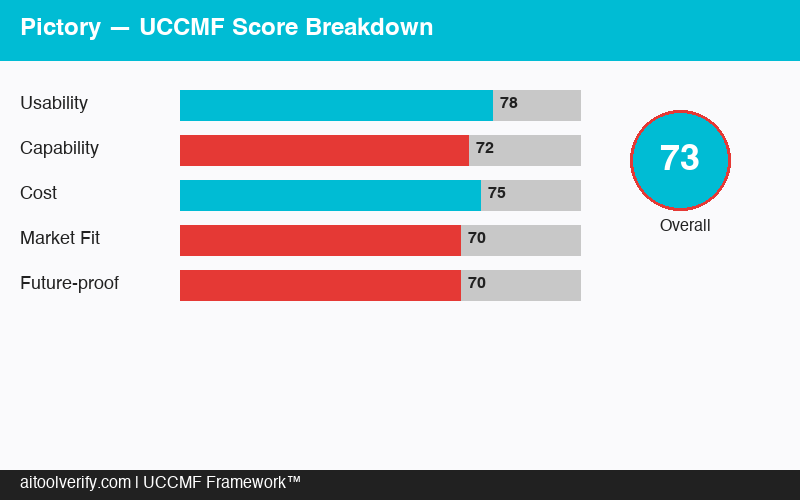
UCCMF Overall Score: 76/100 — Upgraded from 73 thanks to expanded features and flexibility in Pictory 2.0.
🏆 UCCMF Score Breakdown
U — Usability (15%): 85/100
C — Content Quality (25%): 70/100
C — Cost-effectiveness (20%): 82/100
M — Marketing Fit (30%): 74/100
F — Flexibility (10%): 72/100
Weighted Total: 76/100
📑 Table of Contents
- What Is Pictory?
- 🆕 Pictory 2.0: What’s New in March 2026
- How Blog-to-Video Works
- UCCMF Deep Dive
- Blog-to-Video Test: 25 Articles Converted
- Beyond Blog-to-Video: Other Features
- Pricing Breakdown (2026 Updated)
- Pictory vs InVideo vs Lumen5 vs Synthesia
- 🐺 Wolf’s Take
- 🐺 Wolf’s Pick
- FAQ
- Final Verdict
What Is Pictory?
Pictory is an AI-powered video creation platform designed to transform text content into engaging videos. Its core value proposition is simple: you have existing written content (blog posts, articles, scripts, social media posts) that could reach a wider audience as video. Pictory automates the conversion process that would normally require hours of manual video editing.
Founded in 2020, Pictory has grown rapidly in the content repurposing space. The platform is used by over 40,000 marketers, bloggers, and content teams who need to produce video content consistently but lack the time, skills, or budget for traditional video production.
With the Pictory 2.0 launch on March 3, 2026, the platform expanded from four creation modes to eleven, adding AI avatars, prompt-to-video, and interactive video hosting. Here are all the current creation modes:
- Article to Video — Paste a blog URL or text and Pictory generates a video with matching stock footage, captions, and voiceover
- Script to Video — Write or paste a video script and Pictory builds the visual layer automatically
- Edit Video Using Text — Upload a long-form video (webinar, podcast recording) and edit it by editing the transcript text — no timeline editing needed
- Visuals to Video — Upload your own images and clips, and Pictory assembles them into a polished video with transitions and music
- 🆕 AI Avatars — Generate videos with AI presenters that narrate scripts, competing directly with HeyGen and Synthesia
- 🆕 Prompt-to-Video (AI Studio) — Generate scripts, images, and video from a single text prompt
- 🆕 Audio-to-Video — Convert podcasts and audio files into branded, captioned videos
- 🆕 PPT-to-Video — Transform PowerPoint presentations into polished videos via dedicated plugin
- 🆕 AI Script Generator — Create production-ready video scripts from simple prompts
- 🆕 Chrome Extension — Convert any web article into short-form video directly from the browser
- 🆕 Video Summarizer — Condense long-form video content into highlight reels automatically
🆕 Pictory 2.0: What’s New in March 2026
Pictory 2.0, launched March 3, 2026, is the biggest platform update since the company’s founding. It transforms Pictory from a focused text-to-video tool into a full end-to-end AI video solution. Here are the headline features:
AI Avatars
Pictory now offers AI-generated avatar presenters — a direct challenge to Synthesia and HeyGen. You can select from a library of AI avatars to narrate your scripts, creating talking-head style videos without filming anyone. This is particularly powerful for training content, product explainers, and corporate communications. If you’re comparing avatar options, see our Synthesia review for a head-to-head breakdown.
AI Studio (Prompt-to-Video)
The AI Studio is Pictory 2.0’s most significant addition. Instead of preparing a blog post or script first, you can enter a simple text prompt and Pictory handles the entire pipeline — writing the script, selecting visuals, generating the video, and applying voiceover. This “idea-to-video” workflow puts Pictory closer to what InVideo AI has been pushing, and it dramatically lowers the barrier to video creation.
Pictory Central (Interactive Video Hosting)
This is Pictory’s play for the enterprise training market. Pictory Central adds:
- In-video quizzes for testing viewer comprehension
- Clickable CTAs embedded at any point in the video timeline
- SCORM export for integration with learning management systems (LMS)
- Analytics dashboard tracking viewer engagement and completion rates
- Streaming for live or on-demand video delivery
Companies using Pictory to create training videos no longer need a separate platform like Vimeo or Wistia for hosting and interactivity.
Other 2.0 Additions
- Audio-to-Video — Upload a podcast or audio file; Pictory generates matched visuals, captions, and branding automatically
- PPT-to-Video — Integrates directly with PowerPoint, converting slide decks into narrated videos
- Chrome Extension — See an article worth repurposing? Click the extension and get a video draft without leaving your browser
- Video Summarizer — Automatically condenses long-form videos into highlight reels
- ElevenLabs Integration — Higher-tier plans integrate with ElevenLabs for more realistic AI voiceovers
Coming Soon
Pictory has confirmed three upcoming features: voice cloning (create videos with a clone of your own voice), custom avatars (generate personalized AI presenters from uploaded footage), and mobile creation. No specific release dates announced yet.
How Blog-to-Video Works
Pictory’s flagship feature is the Article to Video converter. Here’s exactly how it works:
Step 1: Input Your Content
Paste a blog URL or copy-paste the article text. Pictory’s AI reads the content and extracts the key points, organizing them into scenes. A 1,500-word blog post typically generates 8–12 scenes, each representing a key idea or paragraph.
Step 2: AI Scene Generation
For each scene, Pictory automatically:
- Selects a relevant stock video or image from its 15M+ library
- Extracts a summary text overlay from the paragraph
- Assigns a voiceover segment reading the key points
- Adds transitions between scenes
The AI scene matching has improved considerably. In our testing, approximately 80% of auto-selected visuals were contextually appropriate. The remaining 20% needed manual swapping — typically abstract concepts or niche topics where stock footage is limited.
Step 3: Customize and Refine
The editor allows you to:
- Swap any stock footage with alternatives or your own uploads
- Edit text overlays for length and clarity
- Change voiceover voice and speed
- Add, remove, or reorder scenes
- Apply your brand template (colors, fonts, logo, watermark)
- Select background music from the royalty-free library
- Adjust scene duration
- 🆕 Add an AI avatar presenter for a talking-head intro or full narration
Step 4: Generate and Export
Render your video and export as MP4. Pictory supports up to 1080p on paid plans. You can also generate multiple aspect ratios from the same project — landscape for YouTube, portrait for Reels/TikTok, and square for Facebook/LinkedIn. New in 2.0: You can also host your video directly on Pictory Central with interactive CTAs and analytics.
Typical timeline: From pasting a blog URL to having a finished, customized video takes 15–25 minutes, depending on how much manual adjusting you do. If you accept Pictory’s defaults with minimal tweaking, it can be under 10 minutes.
UCCMF Deep Dive
U — Usability: 85/100
Pictory’s interface is designed for non-video-editors, and it shows. The workflow is linear and intuitive: input content → review AI suggestions → customize → export. There’s no complex timeline, no keyframing, no audio mixing. If you can use Canva, you can use Pictory.
The biggest usability win is the text-based editing. Instead of scrubbing through video on a timeline, you edit text and the video adjusts. This is incredibly natural for writers and content marketers who think in words, not frames.
What we liked:
- Blog URL input makes conversion genuinely one-click to start
- Scene-based editing is more intuitive than timeline-based for non-editors
- Stock footage swapping is fast with smart search suggestions
- Brand template system saves significant time on repeat productions
- Preview renders quickly, allowing rapid iteration
- 🆕 Chrome extension makes repurposing even faster — no copy-pasting URLs
- 🆕 AI Studio prompt-to-video is dead simple — type an idea, get a video
What needs improvement:
- No undo history — making a mistake means manually reverting changes
- The editor can lag when projects exceed 20 scenes
- Font and text animation options are limited compared to Canva Video
- No mobile app yet (confirmed as coming soon)
C — Content Quality: 70/100 (↑ from 68)
Content quality has improved in Pictory 2.0, primarily thanks to AI avatars and ElevenLabs integration. The addition of AI avatar presenters means videos no longer have to rely solely on stock footage — you can have a talking-head presenter adding a human element. The ElevenLabs voice integration on higher plans produces noticeably more natural voiceovers than Pictory’s built-in TTS.
That said, the fundamental approach for blog-to-video content remains stock footage with text overlays, producing social-media-grade video content rather than broadcast quality.
- Visual relevance of auto-selected footage: 80% contextually appropriate, 20% needing replacement
- Text overlay readability: Good on desktop, occasionally too small on mobile (especially 9:16 format)
- Voiceover quality: Natural-sounding but lacks emotional variation — ElevenLabs integration on Pro plan significantly improves this
- AI Avatar quality: Solid for corporate/training use; not yet as polished as Synthesia’s avatars but very usable
- Transition smoothness: Clean but repetitive — the same 5–6 transitions dominate
- Overall production feel: Comparable to a well-made social media graphic in motion — avatar videos feel more professional
Where Pictory’s quality shines is in captioned videos for silent autoplay. Social media feeds autoplay without sound, making text-heavy video content highly effective. Pictory’s auto-captioning and text overlay system is excellent for this use case.
C — Cost-effectiveness: 82/100 (↑ from 80)
With Pictory 2.0, you’re now getting AI avatars, prompt-to-video, interactive hosting, and seven new creation modes at the same price points as before. The value-per-dollar has clearly increased.
Let’s compare the alternatives for repurposing a blog post into video:
- Freelance video editor: $100–$300 per video, 2–5 day turnaround
- In-house editor: $50K–$80K annual salary + software licenses
- Pictory Starter: ~$0.13 per minute of video, 15–25 minute turnaround
The math works overwhelmingly in Pictory’s favor for volume content repurposing. If you’re converting 10+ blog posts to video per month, the time and cost savings are transformative.
M — Marketing Fit: 74/100 (↑ from 72)
Pictory 2.0’s expanded feature set improves its marketing fit. AI avatars open up product demos and explainer videos that were previously off-limits. Pictory Central’s interactive CTAs make it viable for lead generation and training funnels.
Where it fits well:
- Blog content distribution — Convert every blog post into a LinkedIn video, Instagram Reel, and YouTube Short
- Social media content calendar — Maintain consistent video posting without a video team
- 🆕 Product explainers — AI avatars enable talking-head product demos without filming
- 🆕 Corporate training — Pictory Central with SCORM export for LMS integration
- Podcast/webinar highlights — Use “Edit Video Using Text” or the new Audio-to-Video mode
- SEO — Embedding video on blog posts can increase time-on-page and reduce bounce rate
- Email marketing — Embed video thumbnails in newsletters to increase click-through rates
Where it falls short:
- High-end brand campaigns — The stock footage aesthetic still doesn’t convey brand uniqueness
- YouTube SEO — YouTube’s algorithm favors authentic, long-form content over stock-footage compilations
- Paid advertising — Video ads need hooks and emotion that Pictory’s format struggles to deliver
Looking for tools specialized in AI product photography? Check our dedicated roundup for visual commerce tools.
F — Flexibility: 72/100 (↑ from 65)
This is where Pictory 2.0 shows the biggest improvement. The jump from 4 creation modes to 11 dramatically expands what you can do:
- 🆕 AI avatars open up talking-head and presenter-style videos
- 🆕 Prompt-to-video eliminates the need for pre-written content
- 🆕 Audio-to-video serves podcasters and audio content creators
- 🆕 PPT-to-video bridges presentation and video workflows
- 🆕 Pictory Central hosting means you don’t need separate video hosting
- Aspect ratio presets (16:9, 9:16, 1:1) remain solid
- Brand template system allows consistent output at scale
Remaining limitations: no custom animations or motion graphics, no green screen compositing, and no API for automated workflows yet. But compared to where Pictory was even three months ago, the flexibility gains are substantial.
Blog-to-Video Test: 25 Articles Converted
We converted 25 blog articles across three niches to evaluate Pictory’s real-world performance for content repurposing.
Test Setup
- 10 marketing/business articles (1,000–2,500 words)
- 8 technology/software review articles (1,500–3,000 words)
- 7 lifestyle/health articles (800–1,500 words)
- All articles were existing published blog posts with proven organic traffic
- Videos were published on LinkedIn, Facebook, and embedded on the original blog posts
- Performance tracked over 30 days
Production Results
- Average conversion time: 18 minutes per video (including ~12 min customization)
- Scene accuracy: 80% of auto-selected scenes required no changes; 20% needed footage swaps
- Average video length: 2:15 for short-form articles, 4:30 for long-form
- Voiceover accuracy: 95%+ — pronunciation errors were rare and mostly on brand/product names
- Text extraction quality: Pictory’s AI summarized key points well for 22/25 articles; 3 articles required significant text editing due to complex or technical content
Marketing Performance Results
- LinkedIn engagement: Video posts received 3.2x more impressions and 2.8x more engagement than text-only posts sharing the same articles
- Facebook reach: Video posts achieved 2.1x more organic reach than link posts
- Blog time-on-page: Articles with embedded Pictory videos saw a 28% increase in average time-on-page
- Blog bounce rate: 8% reduction in bounce rate for pages with embedded video
- Click-through to blog: 14% of social media video viewers clicked through to the full article
- Cost per video: $1.63 (Professional plan) — total 25-video production cost: ~$41
Key Findings
1. LinkedIn was the best-performing platform. Pictory’s stock-footage-with-text format actually aligns perfectly with LinkedIn’s professional content style. The captioned video format performed exceptionally well in LinkedIn feeds where users watch without sound.
2. Quality expectations matter by platform. On LinkedIn and Facebook, Pictory videos performed great. When we tried the same videos on YouTube, performance was poor — YouTube audiences expect higher production value and more authentic presentation.
3. Short articles convert better than long ones. Articles under 1,500 words produced tighter, more engaging videos (under 2:30). Longer articles resulted in videos that felt drawn out and repetitive. For long-form content, we recommend selecting only the top 5–7 key points rather than converting the entire article.
4. The SEO benefit is real. The 28% time-on-page increase and 8% bounce rate reduction are meaningful SEO signals. Embedding Pictory videos on blog posts is an easy win for on-page engagement metrics.
5. Manual editing still matters. The 10–15 minutes of customization (swapping clips, editing text overlays, adjusting pacing) make a noticeable quality difference. Fully automated output without any editing looks obviously AI-generated.
Beyond Blog-to-Video: Other Features
Edit Video Using Text
This is Pictory’s second most powerful feature. Upload a long-form video (webinar recording, podcast video, interview) and Pictory transcribes it. You then edit the video by editing the transcript — delete sentences to cut sections, highlight passages to create clips, and add captions. No timeline scrubbing required.
We tested this with a 45-minute webinar recording and extracted 6 short clips (30–90 seconds each) in approximately 20 minutes. The same task would take 1–2 hours in a traditional video editor. For content teams repurposing webinars and podcasts, this feature alone is worth the subscription.
AI Avatars (New in 2.0)
Pictory’s new AI avatars let you create talking-head videos without filming. Select from a library of AI presenters, input your script, and the avatar delivers it with natural lip sync and gestures. The quality is solid for corporate and training use — not yet as polished as Synthesia’s avatars, but very usable and included at no extra cost across all plans.
AI Studio / Prompt-to-Video (New in 2.0)
Type a simple prompt like “create a 60-second video about the benefits of content marketing” and Pictory handles everything — script writing, visual selection, voiceover, and assembly. The results are surprisingly coherent for a fully automated pipeline. This is ideal for quick social media content when you don’t have time to write a full script. For a comparison of how this stacks up against InVideo’s similar feature, see our InVideo vs Pictory comparison.
Auto-Highlight
Upload a long video and Pictory’s AI identifies the most engaging segments based on speech patterns, keyword density, and pacing. It’s useful for quickly finding potential clip-worthy moments, though the AI’s judgment on “engaging” doesn’t always match human assessment. We found it correctly identified strong moments about 65% of the time.
Visuals to Video
Upload your own images and video clips, and Pictory assembles them with transitions, music, and text overlays. This mode is less automated but gives you more control over the visual content. It’s particularly useful for ecommerce brands that have product photos and want to create simple product highlight reels. For more specialized product image tools, check our AI product photography tools roundup.
Pricing Breakdown (2026 Updated)
🆕 Updated March 2026: Pictory 2.0 maintains its existing pricing structure with all new features (AI avatars, AI Studio, Pictory Central) included across all tiers. Prices shown are for annual billing.
| Feature | Starter ($25/mo) | Professional ($35/mo) | Team ($119/mo) |
|---|---|---|---|
| Video minutes/month | 200 | 600 | 1,800 |
| AI credits | 100 | 500–1,000 | 2,400 |
| Resolution | 1080p | 1080p | 1080p |
| AI Avatars | ✅ | ✅ | ✅ |
| AI Studio (prompt-to-video) | ✅ | ✅ | ✅ |
| Pictory Central (hosting) | ✅ | ✅ | ✅ |
| AI voiceover | Standard voices | 70+ voices + ElevenLabs | 70+ voices + ElevenLabs |
| Brand kit | — | ✅ | ✅ |
| Chrome Extension | ✅ | ✅ | ✅ |
| Auto-Highlight | — | ✅ | ✅ |
| Team members | 1 | 1 | 3+ |
| Stock library (Storyblocks) | ✅ | ✅ | ✅ |
| Video creation expert consult | ✅ | ✅ | ✅ |
Enterprise plans are available with custom pricing for teams of 10+ with dedicated support.
Key pricing change vs pre-2.0: Pictory now uses a video minutes + AI credits model instead of a flat “videos per month” count. This is more flexible — a 30-second social clip costs far fewer minutes than a 10-minute training video.
Which Plan Should You Choose?
Starter ($25/mo) — Great entry point for solo creators and bloggers testing blog-to-video workflows. 200 video minutes is enough for ~20–30 short social videos per month. All new 2.0 features are included.
Professional ($35/mo) — Best for solo marketers and small businesses with regular video needs. 600 minutes, premium voices via ElevenLabs, and brand kit make this the sweet spot for most users.
Team ($119/mo) — For content teams needing collaboration and high volume. 1,800 minutes and 3+ seats justify the price for agencies or multi-person marketing teams.
Start Your Free Pictory Trial →
Pictory vs InVideo vs Lumen5 vs Synthesia
| Feature | Pictory 2.0 | InVideo AI | Lumen5 | Synthesia |
|---|---|---|---|---|
| Starting Price | $25/mo | $25/mo | $29/mo | $18/mo |
| Blog-to-Video | ⭐⭐⭐⭐⭐ | ⭐⭐⭐ | ⭐⭐⭐⭐ | — |
| AI Avatars | ⭐⭐⭐ (new) | Basic | — | ⭐⭐⭐⭐⭐ |
| Prompt-to-Video | ⭐⭐⭐⭐ (new) | ⭐⭐⭐⭐⭐ | ⭐⭐⭐ | ⭐⭐⭐ |
| Video-to-Clips | ⭐⭐⭐⭐ | ⭐⭐⭐⭐ | ⭐⭐⭐ | — |
| Interactive Hosting | ✅ (Pictory Central) | — | — | Basic |
| Stock Library Size | 15M+ (Storyblocks) | 16M+ | 10M+ | N/A |
| Creative Control | ⭐⭐⭐ | ⭐⭐⭐⭐⭐ | ⭐⭐⭐ | ⭐⭐ |
| Best For | Blog repurposing + training | Creative flexibility | Brand marketing | Avatar-based videos |
| UCCMF Score | 76/100 | 74/100 | 71/100 | 80/100 |
When to Choose Pictory
Choose Pictory if: Your primary goal is repurposing written content (blog posts, articles, scripts) into video for social media distribution, AND you want AI avatars and interactive hosting in one platform. Pictory 2.0’s combination of blog-to-video excellence + new avatar/hosting features makes it the most versatile mid-range option. See our detailed InVideo vs Pictory comparison for a deeper breakdown.
Choose InVideo AI if: You want maximum creative control and the best prompt-to-video experience. InVideo’s AI director approach gives you more influence over the creative output.
Choose Lumen5 if: You want similar blog-to-video capabilities with a more polished, brand-oriented aesthetic.
Choose Synthesia if: AI avatars are your primary need. Synthesia’s avatar quality is still industry-leading, even as Pictory and others catch up.
🐺 Wolf’s Take
I’ve been following Pictory since its early days, and the 2.0 update genuinely surprised me. This isn’t an incremental feature bump — it’s a platform-level reinvention. Adding AI avatars, prompt-to-video, and interactive hosting at no price increase is an aggressive move that puts serious pressure on Synthesia and HeyGen.
Here’s what matters from a marketing ROI perspective: Pictory 2.0 at $35/month (Professional) now does what used to require three separate subscriptions — a text-to-video tool ($25–49), an avatar video tool ($18–89), and a video hosting platform ($15–50). That’s $60–190/month collapsed into a single $35 plan. Even if each individual feature isn’t best-in-class, the bundled value proposition is hard to beat.
The Pictory Central hosting feature is the sleeper hit that most reviewers are overlooking. Interactive CTAs embedded in video? SCORM export for enterprise training? Analytics on viewer engagement? This turns Pictory from a content creation tool into a content delivery tool. For B2B marketers and corporate training teams, that’s a game-changer.
My biggest concern: feature sprawl. Pictory went from doing one thing extremely well (blog-to-video) to trying to be an everything-video-platform. History shows that “do everything” platforms often end up doing nothing exceptionally. I’ll be watching whether blog-to-video quality holds steady or starts getting neglected as engineering resources spread across 11 creation modes.
The upcoming voice cloning and custom avatars could be the features that truly differentiate Pictory from the pack. If they nail personalized avatar creation at $25–35/month while HeyGen charges $48+, that’s a massive market opportunity.
Bottom line: Pictory 2.0 is the biggest value upgrade in the AI video space this year. If you were on the fence before, now is the time to try it. The risk-reward ratio at $25/month with a 14-day free trial is as close to zero-risk as it gets in SaaS.
🐺 Wolf’s Pick
My recommended strategy for 2026: Professional plan ($35/mo) + a systematic repurposing workflow:
- Every new blog post → Convert to a 2-minute Pictory video → Post on LinkedIn and Facebook
- Your top 20 evergreen articles → Convert to video → Embed on the blog post pages (28% time-on-page boost)
- Webinar/podcast recordings → Use “Edit Video Using Text” to extract 5–8 short clips → Drip-feed on social media
- 🆕 Product explainers → Use AI avatars for talking-head demos → Embed on product pages and landing pages
- 🆕 Quick social content → Use AI Studio prompt-to-video for same-day posts → No scripting required
This strategy can double your content’s reach without creating anything new. The ROI is almost guaranteed because you’re extracting additional value from content you’ve already paid to create.
Who should NOT use Pictory: If you need cinematic brand campaigns or your audience demands premium production value, Pictory isn’t the right tool. It’s a volume repurposing and training engine, not a production studio. Use it for what it’s designed for and the results will follow.
Frequently Asked Questions
Is Pictory good for YouTube videos?
Pictory can produce YouTube-compatible videos, but we don’t recommend it as your primary YouTube tool. YouTube audiences expect original, authentic content — stock footage compilations tend to underperform. However, Pictory works well for creating YouTube Shorts from existing blog content or for supplementary channel content. For your main YouTube strategy, invest in original video production or consider avatar-based tools like Synthesia.
How accurate is the blog-to-video AI conversion?
In our testing, Pictory’s AI correctly identified key points and selected appropriate stock footage about 80% of the time. The remaining 20% required manual adjustment — typically swapping stock clips that were too generic or irrelevant. Text extraction (summarizing paragraphs into video overlay text) was accurate for 22 out of 25 articles. Highly technical or abstract content posed the most challenges.
What’s new in Pictory 2.0?
Pictory 2.0 (launched March 3, 2026) adds AI avatars, prompt-to-video via AI Studio, audio-to-video conversion, PPT-to-video, a Chrome extension, AI script generator, video summarizer, and Pictory Central (interactive video hosting with quizzes, CTAs, and SCORM export). Voice cloning and custom avatars are confirmed as coming soon.
How does Pictory compare to InVideo AI?
Pictory excels at blog-to-video conversion and now offers AI avatars and interactive hosting. InVideo AI offers stronger creative control and a more polished prompt-to-video experience. For a detailed breakdown, see our InVideo vs Pictory comparison. If blog repurposing is your main need, Pictory wins. If creative flexibility matters more, InVideo is the better choice.
Can I use my own footage in Pictory?
Yes, you can upload your own video clips and images to replace any auto-selected stock footage. You can also use the “Visuals to Video” mode to build videos entirely from your own assets. This is especially useful for ecommerce brands that have product photos and want to create product highlight videos.
Does Pictory have AI avatars now?
Yes, as of Pictory 2.0 (March 2026), AI avatars are available across all plans. You can select from a library of AI presenters to narrate your scripts. Custom avatars (created from your own footage) and voice cloning are coming soon.
What languages does Pictory support for voiceover?
Pictory supports AI voiceover in 20+ languages including English (multiple accents), Spanish, French, German, Portuguese, Italian, Japanese, Korean, Chinese, Hindi, and more. The Professional plan integrates with ElevenLabs for more realistic narration. The voiceover quality is best in English; other languages are improving but may lack natural intonation for complex sentences.
See what other users think on G2.
Final Verdict
Pictory 2.0 is a fundamentally different product from what we reviewed just months ago. The addition of AI avatars, prompt-to-video, interactive hosting, and five other creation modes transforms it from a specialized blog-to-video converter into a genuine all-in-one AI video platform — all at the same price points.
Our 25-article test confirmed the core value proposition remains strong: 3.2x more LinkedIn impressions, 28% increase in blog time-on-page, and a total production cost of ~$41 for all 25 videos. The new 2.0 features add capabilities that previously required separate subscriptions costing $60–190/month combined.
The risk is feature sprawl — trying to compete with Synthesia on avatars, InVideo on creative control, and Wistia on hosting all at once is ambitious. But at $25/month with a 14-day free trial, the downside risk for trying it is effectively zero.
For content marketers who want to repurpose written content into video, Pictory remains the best tool for the job. Now it can also handle avatar videos, training content, and video hosting — making it one of the best values in the AI video space for 2026.
📋 Pictory — Final Score Card
- UCCMF Score: 76/100 (↑ from 73)
- Best For: Blog-to-video conversion, social media repurposing, AI avatar videos, corporate training, webinar clip extraction
- Not For: Cinematic brand campaigns, YouTube main content, high-end paid advertising
- Pricing: From $25/month (Starter) — Professional at $35/month for full features
- Free Trial: 14 days
- Top Feature: Blog URL to video in under 10 minutes + AI avatars + interactive hosting
- Biggest Improvement: 11 creation modes (up from 4), AI avatars, Pictory Central hosting
- Biggest Weakness: Feature sprawl risk; stock footage aesthetic still limited for premium use
Looking for Alternatives?
If Pictory doesn’t fit your needs, check out our reviews of these top alternatives:
- InVideo AI — Best for creative flexibility and prompt-to-video. More control over the final output than Pictory, ideal for marketers who want to customize every detail.
- Synthesia — The leading AI avatar video platform for professional marketing content. Best-in-class avatar quality for product demos, explainers, and brand content.
Also explore our best AI video generators roundup for a complete comparison.
📚 You Might Also Like
- 🎬 InVideo AI Review 2026 — The best prompt-to-video tool with maximum creative control
- 🤖 Synthesia Review 2026 — Industry-leading AI avatar videos for enterprise and marketing
- ⚔️ InVideo vs Pictory — Head-to-head comparison of two top AI video tools
- 🏆 Best AI Video Generators 2026 — Complete roundup of the top tools
- 📸 AI Product Photography Tools — Best AI tools for ecommerce visual content